


Short answer: talking flash cards pair printed pictures and words with an audio reader. A child selects part of a card, the reader plays the matching sound or spoken English, and the child can listen, point, repeat, or answer a simple question. The exact action depends on the product: some readers use inserted cards, while a tap-to-learn reader is placed over a printed word or picture.
The MiniFly Dolphin Tap-to-Learn Toy uses the second approach. Its reading sensor is placed over an item on one of the included cards, so children can move around the page instead of feeding a card into a slot. The included set works without a phone, app, home Wi-Fi connection, or internet service.

Featured MiniFly product
A Tap-to-Learn Reader for Screen-Free Play
Explore the current set with the dolphin reader, 55 double-sided English learning cards, USB-C charging, and parent-friendly volume controls.
How Do Talking Flash Cards Work Step by Step?
- Choose a card. Start with a familiar topic or a page with only a few items.
- Turn on the reader and set the volume. Use a comfortable level for the room before handing it to a child.
- Select a picture or word. With the MiniFly dolphin reader, place the sensor over the printed area you want to hear.
- Listen to the matching audio. The current MiniFly set includes English words, sentences, conversations, and songs.
- Respond in a simple way. A child can repeat the word, point to the matching picture, find another example, or use the word in a short sentence.
The product controls the audio response, but the learning routine comes from how the child and adult use it. A short, repeatable activity is usually easier to follow than trying to finish many cards at once.
Tap-to-Learn Readers and Slot-Style Readers Are Different
Many talking flash-card toys ask the child to insert one card into a reader. A tap-to-learn design lets the child move the reader across a larger printed card and select different items. Neither format is automatically better for every family; the useful question is which action is clearer and more comfortable for the child.
| Reader format | How the child uses it | What parents should check |
|---|---|---|
| Slot-style card reader | Insert one compatible card into the reader | Card orientation, insertion force, and whether cards are easy to organize |
| Tap-to-learn reader | Place or move the reader over a picture or word | Sensor placement, page layout, hand size, and volume control |
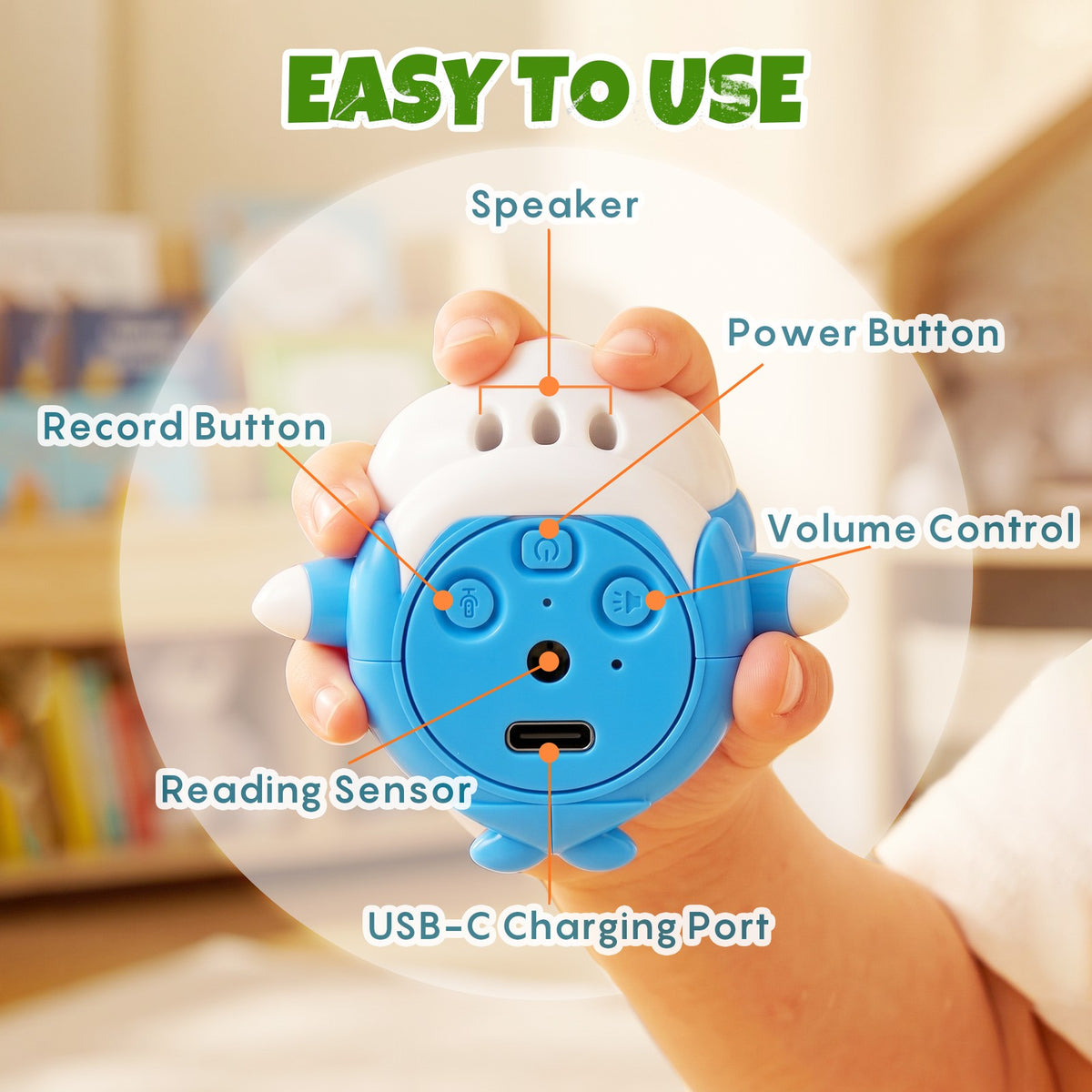
The MiniFly AR26 is a tap-to-learn reader. The back controls include power, record, and volume buttons, along with the reading sensor, speaker, and USB-C charging port.
What Can Children Do With Talking Flash Cards?
Talking cards can support several kinds of play without requiring a screen. Keep expectations practical: the toy provides audio prompts and printed material, while practice comes from listening and responding.
- Listen and repeat: hear a word or sentence, then say it aloud.
- Point and match: find the image named by the reader or match it to an object nearby.
- Make a short sentence: use a familiar word from the card in a new sentence.
- Take turns: one person chooses an item and the other person finds it.
- Use songs or conversations: change the activity when single-word practice starts to feel repetitive.
These are play ideas, not guaranteed developmental or therapeutic outcomes. A talking-card toy should not be presented as a replacement for teaching, reading together, or professional support when a child needs it.
What Does Screen-Free Mean Here?
For the MiniFly set, screen-free means the included activity does not require a phone, tablet, television, or display on the reader. The child handles printed cards and listens to audio from the toy.
Screen-free does not mean passive or completely independent. Younger children may still need help choosing a card, positioning the reader, adjusting the volume, and putting the cards away. An adult can also turn the audio into a conversation by asking a simple follow-up question instead of moving immediately to the next item.
What Should Parents Check Before Buying?
Age label
Match the product's age label to the child rather than relying on a broad marketplace category. The MiniFly AR26 is labeled for ages 3 years and above, with adult supervision recommended.
Included content
Check the language, card count, and type of activities. The current MiniFly set supports English and includes 55 double-sided cards, which provide 110 learning sides. Its content includes words, sentences, conversations, and songs.
Controls and volume
Look for controls a parent can identify quickly. Adjustable volume is useful when the toy moves between a quiet room, a family area, and travel.
Charging and expected runtime
The MiniFly reader uses USB-C charging and a 180 mAh rechargeable polymer lithium battery. The supplied specification lists about four hours of continuous playback on a full charge; actual runtime varies with volume and use.
Replacement and support
Before buying, check what is included and where to ask questions if a card, cable, or reader has a problem. The MiniFly package includes the dolphin reader, 55 cards, a USB-C cable, and a user manual.
How to Start the First Play Session
- Charge and inspect the set. Follow the supplied charging instructions and keep charging under adult control.
- Choose one simple card. Begin with familiar animals, household objects, or another topic the child already recognizes.
- Demonstrate one selection. Place the reader over one item and wait for the audio to finish.
- Invite one response. Ask the child to repeat, point, or find a matching object. Avoid turning every item into a test.
- Stop while the activity is still enjoyable. A few successful turns can make the next session easier to begin.
- Store the cards together. Keeping the full set organized helps prevent missing cards and makes it easier to choose a topic next time.
You can review the included features, current package contents, and product images on the MiniFly Dolphin Tap-to-Learn Toy product page.
Frequently Asked Questions
Do talking flash cards need Wi-Fi?
It depends on the product. The MiniFly Dolphin reader and its included cards work as a standalone set, so they do not require home Wi-Fi, internet service, an app, or a phone.
How many cards come with the MiniFly Dolphin reader?
The set includes 55 double-sided cards, providing 110 learning sides.
What language does the current MiniFly set support?
The current AR26 version supports English.
How is the reader charged?
It charges through USB-C with the included cable. The supplied specification lists approximately four hours of continuous playback on a full charge, with actual runtime depending on volume and use.
Are talking flash cards a substitute for speech therapy?
No. They are toys that provide printed prompts and audio. They should not be marketed as diagnosing, treating, or curing a speech or developmental condition.
Where can I get help with the product or an order?
Use the MiniFly FAQ and support page for product and order assistance.
Choose a Format Your Child Can Use Clearly
The best talking-card routine is easy to understand, comfortable to repeat, and suited to the child's age. Check how the reader recognizes a card, what content is included, how the volume and charging work, and whether the activity fits the way your family actually plays. For a child age 3 or above who prefers selecting pictures on a larger card, a tap-to-learn format can be a practical alternative to a slot-style reader.